> For the complete documentation index, see [llms.txt](https://docs.zeroauthority.xyz/llms.txt). Markdown versions of documentation pages are available by appending `.md` to page URLs; this page is available as [Markdown](https://docs.zeroauthority.xyz/sip-tracker/cab-voting.md).
# CAB Voting
June 12, 2026
A Guide to CAB Voting on the SIP Tracker
Hey Stackers, the governance process just got another upgrade thanks to the work of the Zero Authority team! CAB members can now cast their official votes directly on the [SIP Tracker](https://www.zeroauthoritydao.com/sip) - no separate forms, no external tools, no chasing down participation. Everything happens in one place, with full visibility for the whole community.\
\
Here's what's new and how it works.What ChangedHistorically, Consideration Advisory Boards (CABs) manage voting through processes where it can be challenging to track participation and for the broader community to observe the governance process in real time. This update brings the full voting workflow (casting votes, tracking participation, and monitoring results) natively into the SIP Tracker.
#### How it Works
**1️⃣**\
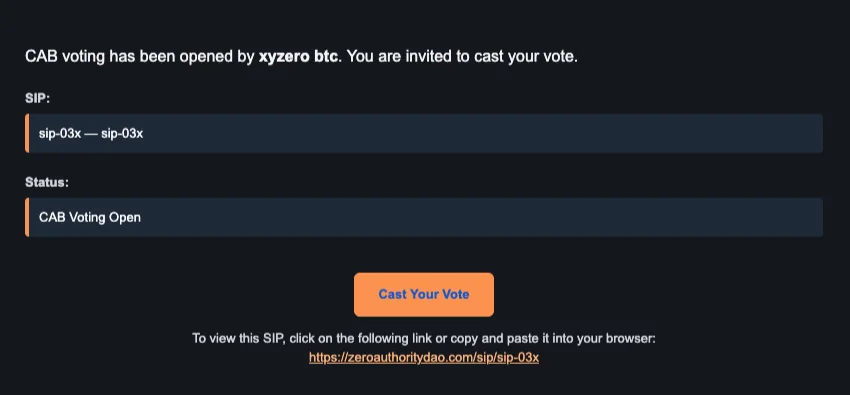
**If you're a current CAB member with a relevant vote opening, you'll receive a notification requesting your vote.**\
\
When CAB voting is opened on a SIP, every CAB member receives an email notification. The email includes the SIP name, current status, and a direct link to cast your vote.\
\  \
2️⃣\
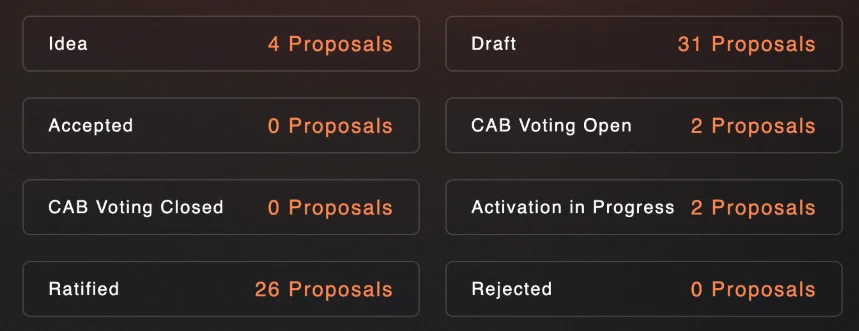
**On the SIP Tracker homepage, the full status board shows how many SIPs are in each stage.**\
\
Any SIPs in *CAB Voting Open* are clearly labeled — click into one to reach the SIP Detail Page, where you'll find your ballot. Community members can view results in real time, but only CAB members will see the option to vote.
\
2️⃣\
**On the SIP Tracker homepage, the full status board shows how many SIPs are in each stage.**\
\
Any SIPs in *CAB Voting Open* are clearly labeled — click into one to reach the SIP Detail Page, where you'll find your ballot. Community members can view results in real time, but only CAB members will see the option to vote.

3️⃣\
**Cast your vote on the SIP Detail Page.**\
\
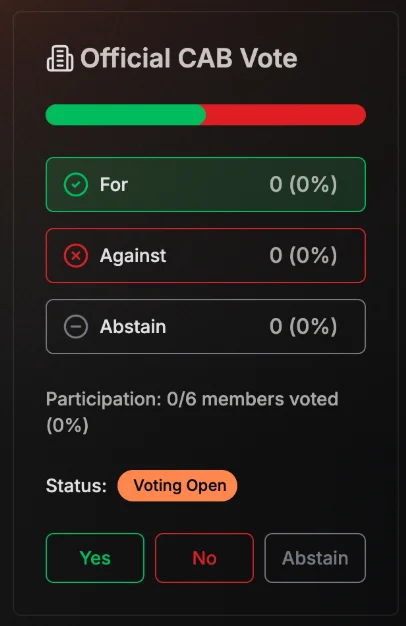
On the right-hand side of any SIP Detail Page with an active vote, you'll find the Official CAB Vote widget. It displays:
* A live vote tally — For, Against, and Abstain counts and percentages
* A participation tracker showing how many of the 6 CAB members have voted
* The current voting status
* Your voting buttons: Yes, No, or Abstain
Select your vote and it's recorded immediately.
4️⃣\
**Track participation in real time.**\
\
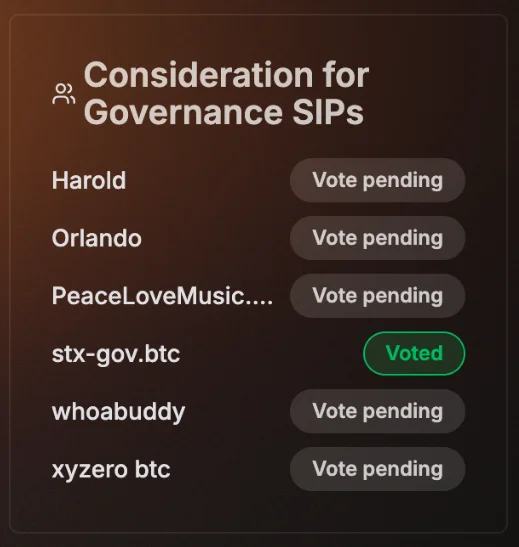
Once your vote is cast, it appears in the vote tally. The Consideration for Governance SIPs panel (visible just above the ballot widget) shows the voting status of each individual CAB member, so the community can see where participation stands at a glance.\
\
Members who have voted show a green Voted badge. Those who haven't yet show Vote pending.
#### Why This Matters
Good governance depends on frictionless participation. By bringing CAB voting into the tracker, the process becomes more transparent, more legible to the community, and easier for CAB members to engage with. Notifications reduce the risk of votes being missed, and real-time participation tracking creates natural accountability without requiring additional overhead.\
\
This is part of an ongoing effort by the Stacks Foundation to strengthen the infrastructure supporting Stacks governance — making sure that the tools match the community's commitment to decentralized, participatory decision-making.
#### For CAB Members
If you're a current CAB member, no setup is required. Make sure the email address associated with your SIP Tracker account is one you check regularly — that's where vote notifications will land (you request an email chance in your respective CAB discussion thread or email Zero directly). When a vote opens, you'll get the email, click through, and cast your vote directly on the tracker.\
\
If you have questions or run into any issues, feel free to reach out: .
*The SIP Tracker is built and maintained as part of the Stacks Foundation's commitment to open governance infrastructure. Learn more about the governance process* [*here*](https://docs.stacks.foundation/)*.*
By Claire Gadd, Stacks Foundation, June 12, 2026 published on .